cellular automata
- 🔥 advanced
- 🗂️ transformation
- ✍️ Gabrielle Partch, Deanna Gelosi
The cellular automata operation takes in a draft as a starting state then iteratively applies an automata rule to the drawdown according to the timestep value.
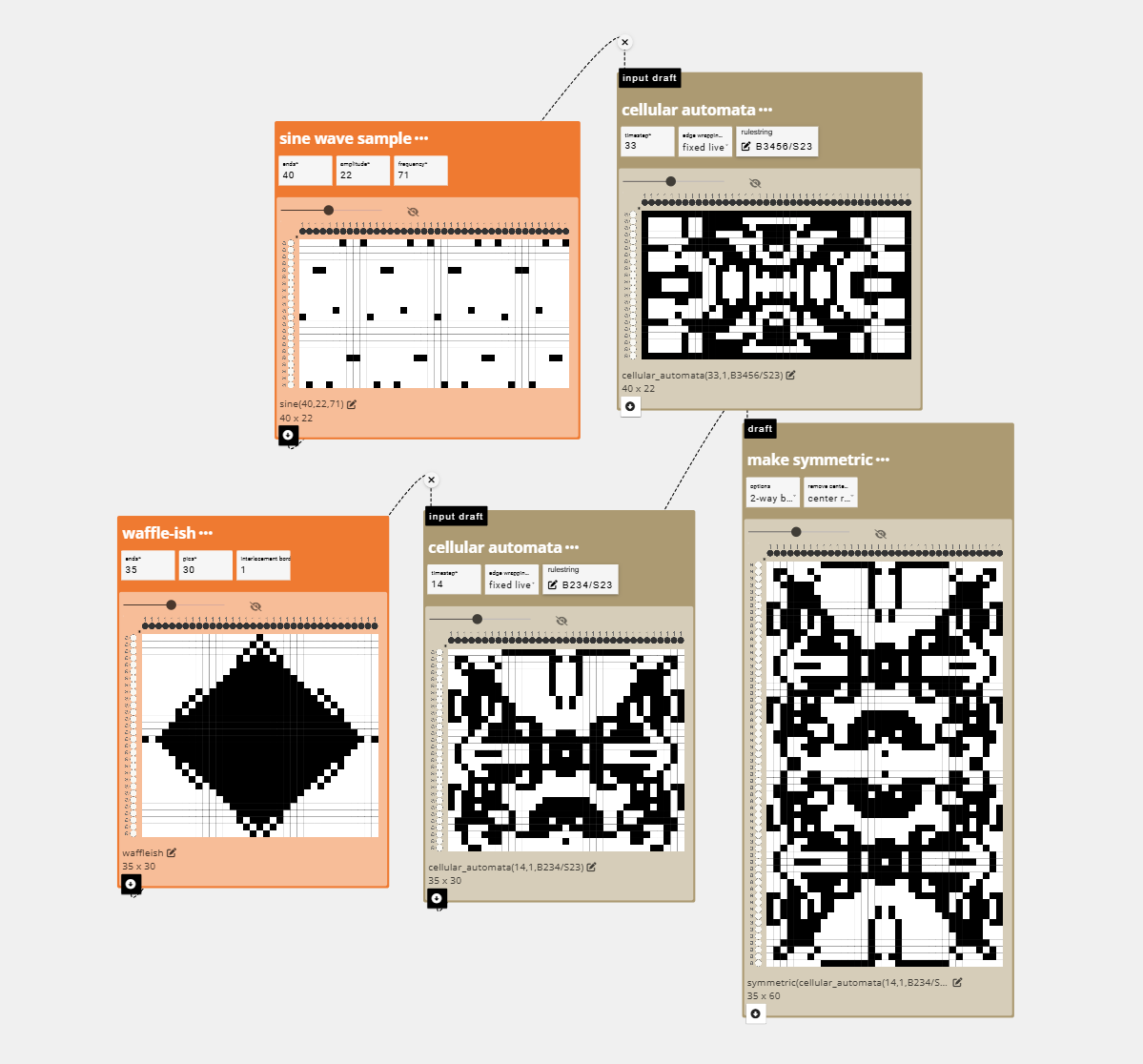
A cellular automaton is a rule applied to a grid over a period of time. The same grid can be read as both a weaving drawdown and as the automata's state on a certain timestep. Each cell in the grid has one of two possible states, represented by a binary value of 0 or 1. These values correspond to both a weaving interlacement and to the two states used in cellular automata. In cellular automata terminology, these two states are conventionally called dead and alive. The operation uses these binary values to determine how each cell changes over successive iterations.
| Drawdown cell | Weaving structure | Cellular automata state | Binary value |
|---|---|---|---|
| White | Warp lowered; weft passes over warp | Dead | 0 |
| Black | Warp raised; weft passes under warp | Alive | 1 |
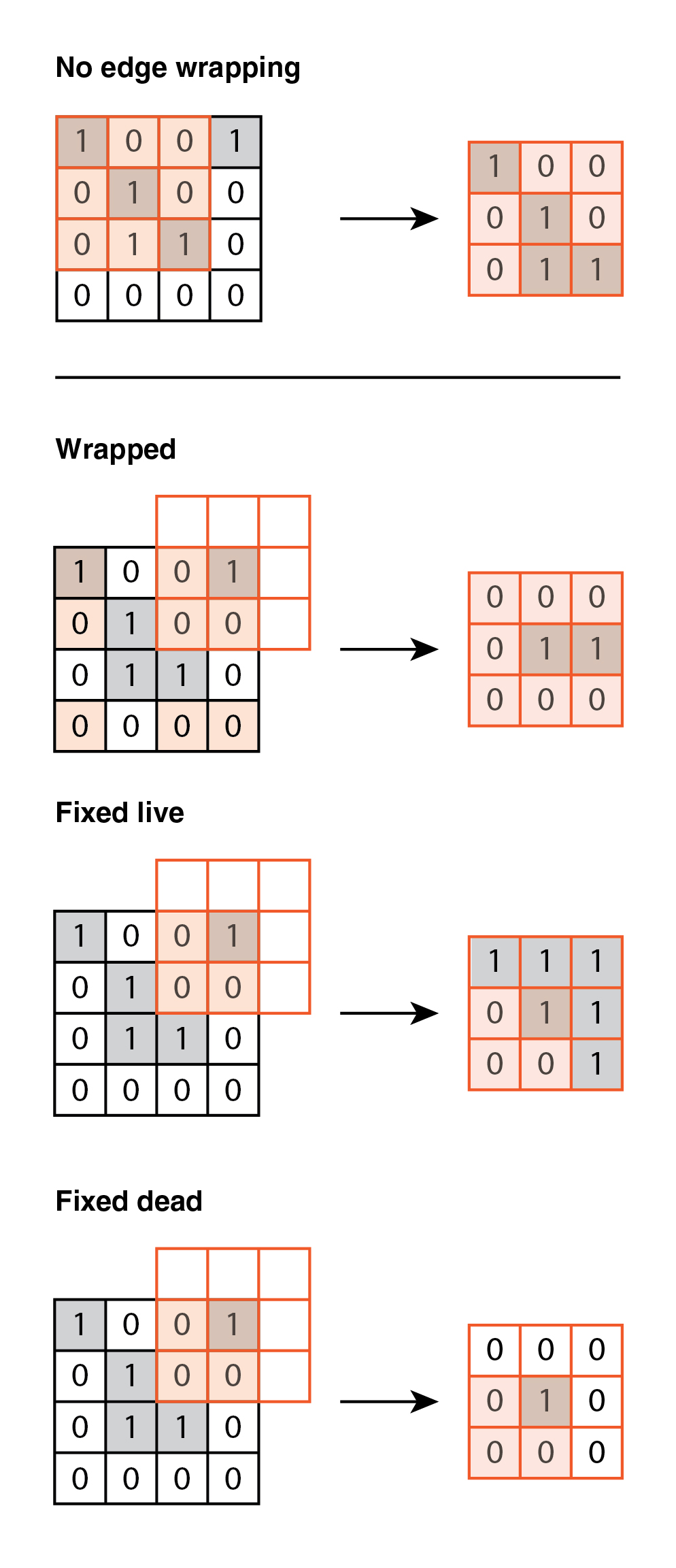
The automaton rule describes how the grid changes on successive iterations. For each cell, the rule looks at the states of a set of surrounding cells called the neighborhood. For this implementation, we use the Moore neighborhood which calculates the state of a cell on its next iteration by looking at the values of the cells immediately adjacent and immediately diagonal.
Automata Rules
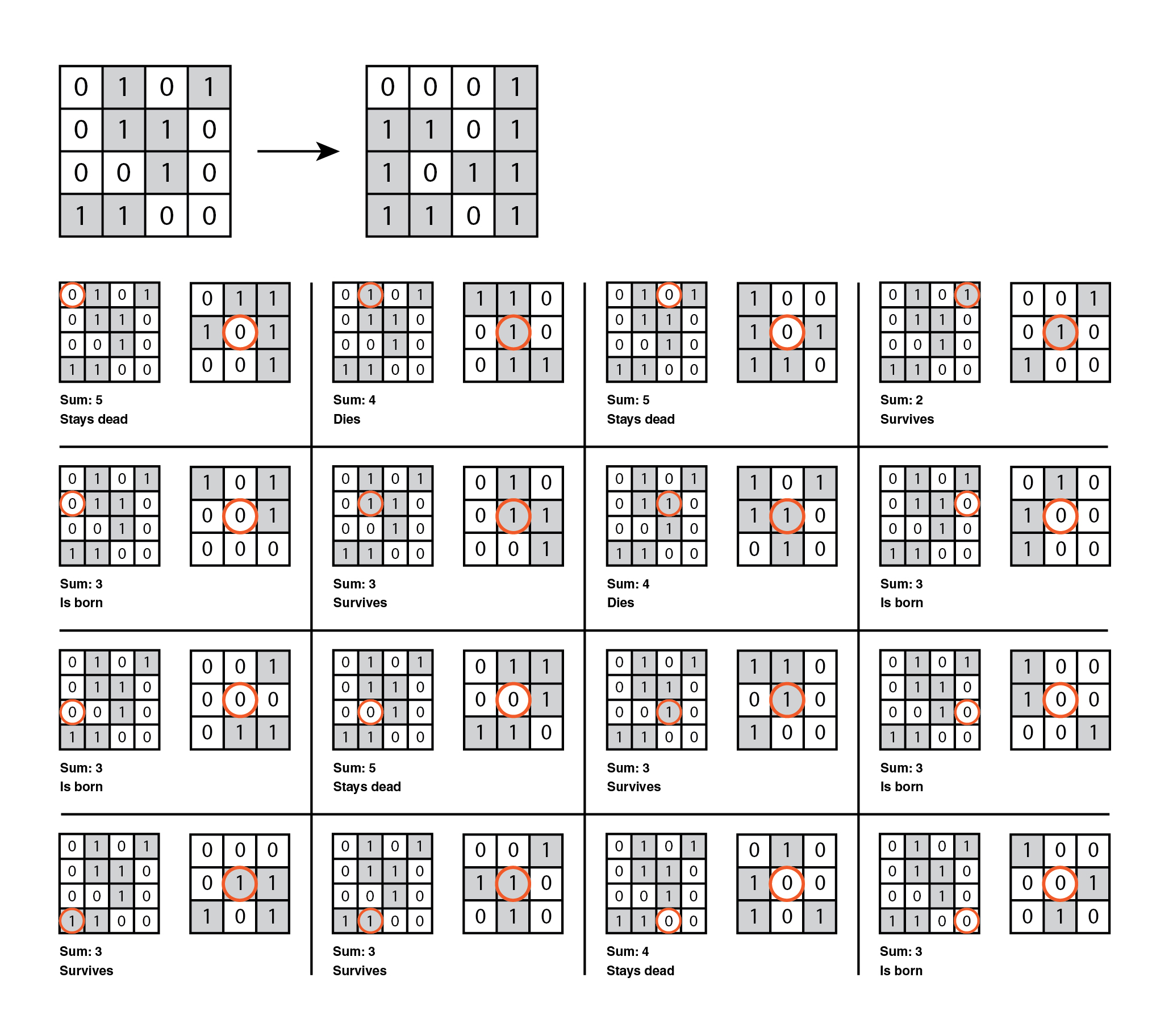
A rule could involve many different ways of parsing the values of neighboring cells, but here we simply sum up all of their values. A white or dead cell is a zero, and a black or live cell is a one, so the sum is the number of living cells in the neighborhood.
The rulestring describes the rule and is separated into two sections delineated by a slash; the first starts with a 'B', which stands for 'born', and the second starts with 'S', which stands for 'survive'. The list of numbers following the 'B' indicates which sum values are required for a cell to be born, and the list of numbers following the 'S' indicates which sum values are required for a cell to survive. For example, consider the rulestring 'B3/S23', which is commonly called Conway's Game of Life. If the cell is currently white, or dead, then the sum must be 3 for the cell to be born or come alive on the next iteration. Likewise, if the cell is currently black, or alive, then the sum must be 2 or 3 for the cell to survive to the next iteration.
Sample Rulesets
| Rule name | B/S rulestring |
|---|---|
| 2×2 | B36/S125 |
| 34 Life | B34/S34 |
| Amoeba | B357/S1358 |
| Assimilation | B4567/S345 |
| Bacteria | B34/S456 |
| Blinkers | B345/S2 |
| Bugs | B3567/S15678 |
| Coagulations | B378/S235678 |
| Coral | B3/S45678 |
| Day and Night | B3678/S34678 |
| Diamoeba | B35678/S5678 |
| Flakes | B3/S12345678 |
| Game of Life | B3/S23 |
| Gnarl | B1/S1 |
| HighLife | B36/S23 |
| Holstein | B4678/S35678 |
| H-trees | B12345678/S1 |
| Iceballs | B5678/S25678 |
| Land Rush | B234578/S36 |
| Life Without Death | B12345678/S3 |
| Long Life | B345/S5 |
| Majority | B5678/S45678 |
| Maze | B12345/S3 |
| Mazectric | B3/S1234 |
| Move | B368/S245 |
| Pseudo Life | B357/S238 |
| Replicator | B1357/S1357 |
| Seeds | B2/S |
| Serviettes | B/S234 |
| Slow Blob | B367/S125678 |
| Stains | B3678/S235678 |
| Walled Cities | B45678/S2345 |
Troubleshooting Guide
Having trouble getting the results you want? Start here! Common issues this section aims to address include: blank drafts (automata immediately killed), repeating/ oscillating patterns, and/ or uninteresting patterns.
Cellular automata can produce a variety of results depending on the starting draft and rulestring. Patterns may quickly die out, settle into a stable or repeating state, or fail to develop much variation. These outcomes are not necessarily errors, but may indicate that the starting draft or rulestring could be adjusted.
When experimenting, consider the arrangement and density of live cells in the starting draft. A mixture of live and dead cells, with varied cluster sizes and irregular gaps, and sufficient space to grow can provide more opportunities for patterns to develop. The random, bitfield, waffle-ish, and sierpinski square structures tend to work well.
The rulestring is another way to influence how patterns develop. Its two parts control different aspects of cell behavior: the values after 'B' determine when dead cells become alive, while the values after 'S' determine when live cells remain alive. Adding values to either part allows cells to change or persist under a wider range of neighborhood conditions, while removing values makes those conditions more restrictive. Experiment with different combinations of birth and survival values to see how they affect the patterns that emerge. The example rulestrings can be a useful starting point for exploring different behaviors.
The edge wrapping mode can also influence pattern development, particularly near the boundaries of the draft. If patterns are being restricted or behaving unexpectedly at the edges, try switching between wrapped, fixed live, and fixed dead modes to see how different boundary conditions affect the results.
Parameters
timestep: the number of iterations that the rule defined by the rulestring is applied.edge wrapping mode: determines what value is used for cells that are outside the draft, the edge-cases, when calculating the next iteration. Wrapped will use the cell value on the opposite side of the grid, fixed live will always use a live value (1), and fixed dead will always use a dead value (0).rulestring: the rule that is applied to the grid on each timestep to calculate the next generation. The rule should be in birth/survival notation using the Moore neighborhood, eg listed values of no more than 9.
Application
This operation can be used to generate different variations of an input draft, forming intricate geometric patterns that have lifelike behavior over time.
Developer
adacad id: cellular_automata
loading...